Layout Menu
Aligning Text on CD/DVD Cover Template
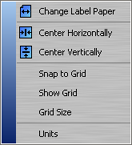
This menu is displayed when you select
Layout from the top menu bar.
Change Label Template:
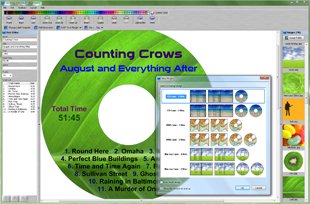
Use this option to change the template for the current CD, DVD, or Blu-ray cover.
The
Change Label Template dialog is displayed.
Center Horizontally:
This option will center text or an image
object on the cover horizontally.
To center the text within an object use the
Text Alignment property on the
Properties Toolbar.
Center Vertically:
This option will center text or an image
object on the cover vertically.
To center the text within an object, use the
Text Alignment property on the
Properties Toolbar.
Snap to Grid:
Use this option to turn on and off the "Snap to Grid" function.
When the "Snap to Grid" function is turned on, text and images can only move along grid increments that are set in the
Grid Size dialog.
Show Grid:
This option is used to show or hide the grid for the "Snap to Grid" function.
The "Show Grid" and "Snap to Grid" functions work independently of each other.
The displayed grid is only used as a guide, and is never printed.
Grid Size:
Use this option to set the grid increments for the "Snap to Grid" function.
The
Grid Size dialog is displayed.
Units:
This option sets the unit of measurement used throughout the program (inches or millimeters).
The
Units dialog is displayed.