Printer Calibration
AudioLabel Help File Topic
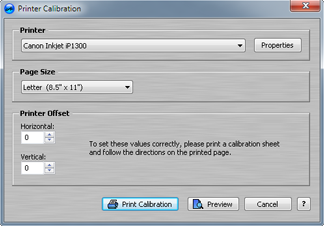
Printer Calibration Dialog of CD Label
This dialog box is displayed when the Printer Calibration option is selected from the
File Menu.
The printer calibration process helps correct any alignment issues with the printer.
It's not uncommon for printers to be a little off when centering the page.
You should only have to calibrate the printer once, after that, the printer settings are remembered by AudioLabel.
The calibration sheet contains printed instructions on how to get the horizontal and vertical offsets for the printer.
Page Size: This option selects the paper size (Letter or A4).
Make sure you use the correct paper size or the Printer Calibration will not work properly.
Printer Offset: This section is where the horizontal and vertical offsets are entered to help align the printer.
To get the correct vertical and horizontal offsets, please follow the instructions printed on the calibration sheet.
Preview: Click this button to see a preview of the Printer Calibration Sheet.